Effortless Social Authentication with Laravel Socialite
Part of the series Empower and Enhance Your VitePress Blog with a Laravel API
With the project structure and quality tools in place, we can start building the API's first user-facing feature: authentication. Since comments should belong to real users, this is a natural next step.
The problem is that authentication is hard, really hard. You have to deal with passwords, email verification, password resets, two-factor authentication, and more. Fortunately, frameworks such as Laravel make this process easier with built-in authentication features and first-party packages such as Fortify.
Even with these tools, we still have to build and manage many parts ourselves: registration, login, password resets, profile management, and the related edge cases. We also need a mail service to send emails.
All of this is feasible, but it takes time and effort. For a simple blog like ours, we can use GitHub for social authentication instead. This simplifies the implementation and lets users sign in with an account they already have.
Before we dive into the implementation, let's take a moment to understand what social authentication is and why it is useful.
Social authentication in a nutshell
Traditionally, when a user wants to create an account on a website, they have to fill out a registration form with their email address and password. This process has worked well for years, but it has its drawbacks. On our side, we have to manage all the data, and on the user side, they have to remember yet another password.
With social authentication, users can log in using their existing accounts on platforms like GitHub, Google, Apple, or Facebook. This means they don't have to create a new account or remember another password. Instead, they can use their existing credentials to log in quickly and easily, which reduces friction and improves the user experience.
For the more technical among you, here's a schema of how it works:
The flow is straightforward:
- The user clicks on the "Log in with GitHub" button on your website.
- The user is redirected to GitHub's authorization page, where they can grant permission for your application to access their GitHub account.
- If the user grants permission, GitHub redirects them back to your website with an authorization code.
- Your website exchanges the authorization code for an access token, which can be used to access the user's GitHub account.
- Your website can now use the access token to fetch the user's profile information from GitHub.
- Your website creates a new user account, or updates an existing one, and logs in the user based on the information received from GitHub.
- Your website redirects the user to the appropriate page after login.
- The user is now logged in and can interact with your website.
Note
You have to note that the user is logged in via our application, not via GitHub. This is super important to avoid sending the access token to the client or to manage multiple providers, or a provider in addition to simple email/password authentication.
Simple, right? Laravel has a first-party package called Socialite that makes this process even easier. It handles the provider-specific OAuth details so that our application can focus on its own users.
Note
Keep in mind that social authentication is not a miracle solution for every project. Even if it can be appealing at first, it can also come with its own set of challenges.
Adding Socialite to the project
First, let's install the package:
composer require laravel/socialiteNext, configure it in config/services.php:
return [
  // ...
  'github' => [
      'client_id' => env('GITHUB_CLIENT_ID'),
      'client_secret' => env('GITHUB_CLIENT_SECRET'),
      'redirect' => env('GITHUB_REDIRECT'),
  ],
];
The env function reads these values from .env. Add the GitHub credentials and callback URL:
GITHUB_CLIENT_ID=your-client-id
GITHUB_CLIENT_SECRET=your-client-secret
GITHUB_REDIRECT=http://localhost:8000/auth/github/callback
The user is logged in through our application, not through GitHub. This distinction matters because we do not send the provider's access token to the client and can support multiple authentication providers later.
At this point, two questions usually arise:
- How do we get the
GITHUB_CLIENT_IDandGITHUB_CLIENT_SECRET? - Why do we need a
GITHUB_REDIRECTURL and how do we get it?
GitHub provides GITHUB_CLIENT_ID and GITHUB_CLIENT_SECRET when you create an OAuth application. Open your GitHub settings, go to Developer settings, select OAuth Apps, and click New OAuth App.
Note
An OAuth application is an application that uses the OAuth protocol to authenticate users. In our case, we are using GitHub as the OAuth provider. Having an OAuth application allows us to use GitHub's authentication system to log in users on our website.
Fill in the form. GitHub is quite permissive about the values you provide during local development.
- The
Application namecan be anything you want. I recommend using the name of your website because it is shown to users when they log in, at least the first time. - The
Homepage URLis the URL of your website. You can usehttp://localhost:8000for local development. - The
Authorization callback URLis where GitHub redirects users after they authorize the application. It must match the value in.env. For local development, usehttp://localhost:8000/auth/github/callback.
Click Register application to create the OAuth application. On its page, you will find the Client ID, which looks like this:
a1b2c3d4e5f6g7h8i9j0A new Client secret must be generated. Click on Generate a new client secret and copy the value. It looks like this:
d13f84af84688a69a71bc8b3808f8836e4c23774Finally, add these values to .env:
GITHUB_CLIENT_ID=a1b2c3d4e5f6g7h8i9j0
GITHUB_CLIENT_SECRET=d13f84af84688a69a71bc8b3808f8836e4c23774
GITHUB_REDIRECT=http://localhost:8000/auth/github/callback
Don't forget to also add the environment variables in your .env.example file.
GITHUB_CLIENT_ID=
GITHUB_CLIENT_SECRET=
GITHUB_REDIRECT=http://localhost:8000/auth/github/callback
Do not commit the client ID or secret. Leave those values empty in .env.example, but keep the redirect URL so that anyone cloning the repository knows how to configure a local OAuth application.
Now that we have everything set up, let's write the code to handle the authentication.
Handling the authentication
For the rest of the project, we will use a test-first approach: write a test, follow its failure, and add only the code needed to make it pass. This helps us define the behavior before implementation and avoids surprises later. It can feel intimidating at first, but Laravel makes the workflow approachable with its built-in testing tools.
Note
This may be test-driven development (TDD), but the label is less important here than the workflow: write the test first, then implement only what is necessary to make it pass.
The redirect
Let's create a new controller called RegisteredViaGitHubController:
php artisan make:controller RegisteredViaGitHubControllerThis controller will contain two methods:
create: This method will handle the redirection to GitHub.store: This method will handle the callback from GitHub.
I tend to use traditional method names for readability and consistency. Keeping these names in mind is useful because the tests will be organized around them.
In the folder tests/Http, we can safely remove the ExampleTest.php file, and then create a new folder called RegisteredViaGitHub and a new test file called CreateTest.php.
mkdir tests/Http/RegisteredViaGitHub
touch tests/Http/RegisteredViaGitHub/CreateTest.php
Within this file, let's write our first test. Really exciting!
<?php

declare(strict_types=1);

use Laravel\Socialite\Facades\Socialite;

test('redirects for authorization', function () {
    Socialite::shouldReceive('driver->redirect')->once();

    $this->get(route('auth.github.redirect'));

    expect(true)->toBeTrue();
});
Note
expect(true)->toBeTrue() gives the test an assertion without adding behavior that we need to verify. If Socialite::shouldReceive('driver->redirect')->once() is not satisfied, the mock will fail the test anyway.
This is our first test, but not our simplest one. It mocks the Socialite facade and verifies that redirect is called once. We use a mock because the test should not send us to GitHub; it only needs to verify that our code asks Socialite to perform the redirect.
Let's run the test:
php artisan test tests/Http/RegisteredViaGitHub/CreateTest.phpIt fails, as expected. In a test-first workflow, the failure tells us what to implement next. We follow the error message and add only the code needed to make the test pass.
➜ php artisan test tests/Http/RegisteredViaGitHub/CreateTest.php

FAILED  Tests\Http\RegisteredViaGitHub\CreateTest > redirects for authorization
  Route [auth.github.redirect] not defined.
The error message is clear, we have to define the route auth.github.redirect. Let's do this in our routes/web.php file:
<?php

declare(strict_types=1);

use App\Http\Controllers\RegisteredViaGitHubController;
use Illuminate\Support\Facades\Route;

// other routes...

Route::get('/auth/github/redirect', [RegisteredViaGitHubController::class, 'create'])
    ->name('auth.github.redirect');
But what is web.php? It is where we define browser-facing routes and map URLs to controller methods. Reading this file gives us a useful overview of the application's entry points.
Tip
I highly recommend you to watch Lessons From the Framework by Luke Dowing to understand how central this file is.
This route responds to /auth/github/redirect and calls the create method on RegisteredViaGitHubController. We also give it the name auth.github.redirect, which lets us reference it from the test and elsewhere in the application.
Let's run the test again:
➜ php artisan test tests/Http/RegisteredViaGitHub/CreateTest.php

 FAILED  Tests\Http\RegisteredViaGitHub\CreateTest > redirects for authorization
  Method redirect(<Any Arguments>) from Mockery_1__demeter_c357969a11a830028afbe426ab0eea17_driver should be called
 exactly 1 times but called 0 times.
The new error message means that the route works, but the controller is not calling Socialite yet. Add that call to the controller:
<?php

namespace App\Http\Controllers;

use Laravel\Socialite\Facades\Socialite;

class RegisteredViaGitHubController extends Controller
{
    public function create()
    {
        return Socialite::driver('github')->redirect();
    }
}
Let's run the test again:
➜ php artisan test tests/Http/RegisteredViaGitHub/CreateTest.php

   PASS  Tests\Http\RegisteredViaGitHub\CreateTest
  ✓ redirects for authorization
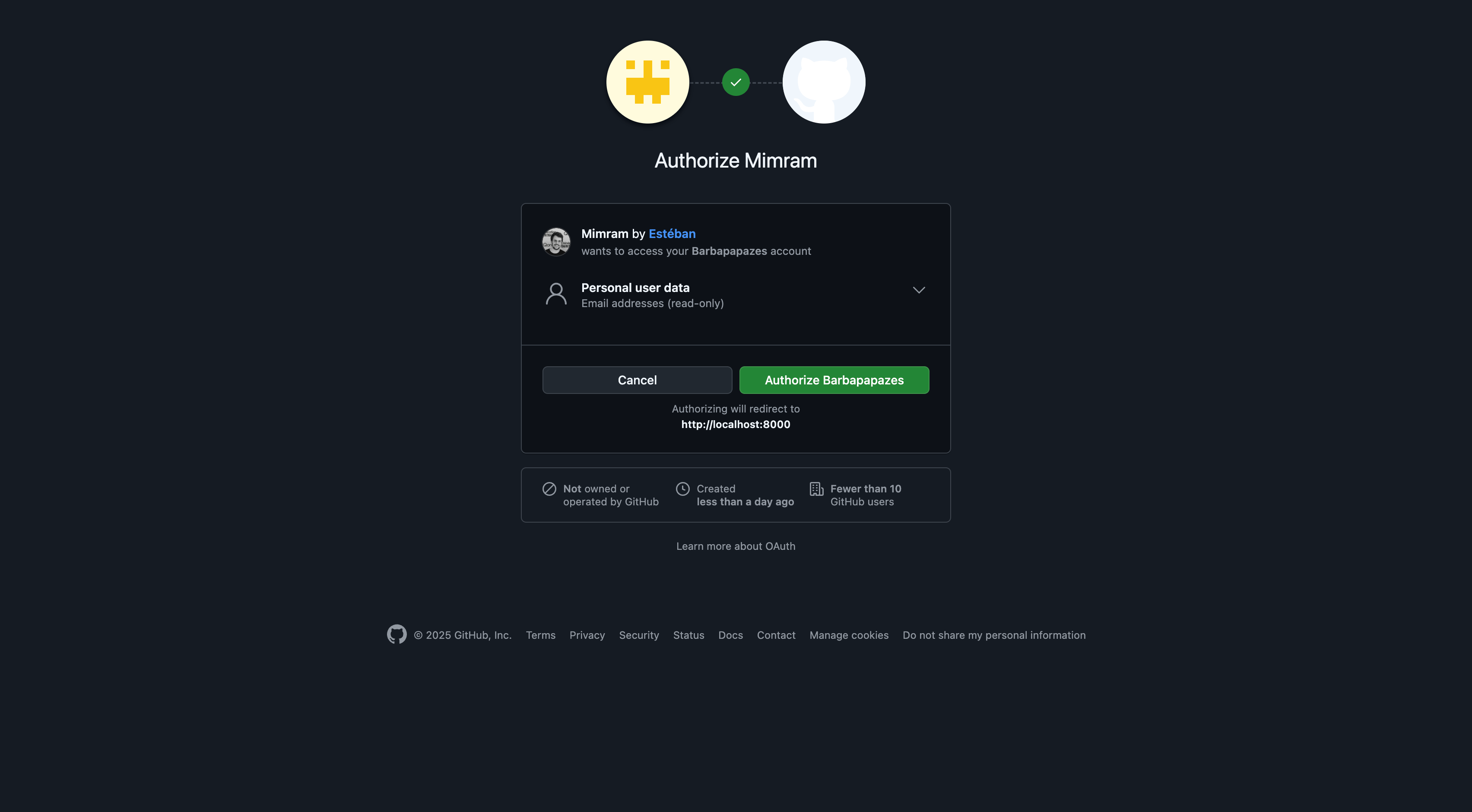
And voilà! The test passes. Start the development server with composer dev and open http://localhost:8000/auth/github/redirect to verify the redirect manually. You should arrive at GitHub's authorization page. 🥳
The callback
Now that you understand the workflow, I will not repeat the instruction to run the test after every small change. Keep following the same loop for the rest of the project and in your own projects.
Let's create a new test file called StoreTest.php in the tests/Http/RegisteredViaGitHub folder.
touch tests/Http/RegisteredViaGitHub/StoreTest.phpStoreTest.php will test the store method of RegisteredViaGitHubController, which handles GitHub's callback. Socialite handles the OAuth exchange, so our application only needs to retrieve the provider user, save it, and authenticate that user.
First, let's write a test to ensure that a user can be logged in:
<?php

declare(strict_types=1);

use Laravel\Socialite\Facades\Socialite;
use Laravel\Socialite\Two\User as SocialiteUser;

test('registers successfully', function () {
    $fakeGitHubUser = fakeGitHubUser();

    $this->get(route('auth.github.callback'));

    $this->assertAuthenticated();

    $this->assertDatabaseHas('users', [
        'github_id' => $fakeGitHubUser->getId(),
        'email' => $fakeGitHubUser->getEmail(),
        'name' => $fakeGitHubUser->getName(),
    ]);
});

/**
 * Create a fake GitHub user and mock the Socialite driver.
 *
 * @param  array<string, mixed>  $attributes
 */
function fakeGitHubUser(array $attributes = []): SocialiteUser
{
    $fakeGitHubUser = (new SocialiteUser)->map(attributes: array_merge([
        'id' => '12345',
        'nickname' => 'testuser',
        'email' => 'test@example.com',
        'name' => 'Test User',
        'avatar' => 'https://example.com/avatar.jpg',
    ], $attributes));

    Socialite::shouldReceive('driver->user')->once()->andReturn($fakeGitHubUser);

    return $fakeGitHubUser;
}This test creates a fake GitHub user and mocks Socialite to return it when user is called. We avoid a real HTTP request to GitHub, and the fakeGitHubUser helper keeps that setup reusable and the test readable.
Then, we call the auth.github.callback route and assert that the user is authenticated and saved in the database.
Now, let's follow the error message from our test.
- The route
auth.github.callbackis not defined. Let's define it in ourroutes/web.phpfile:
Route::get('/auth/github/callback', [RegisteredViaGitHubController::class, 'store'])
->name('auth.github.callback');- The user is not authenticated. Implement the
storemethod in the controller:
<?php

declare(strict_types=1);

namespace App\Http\Controllers;

use Illuminate\Support\Facades\Auth;
use Laravel\Socialite\Facades\Socialite;

final class RegisteredViaGitHubController extends Controller
{
    public function store()
    {
        $githubUser = Socialite::driver('github')->user();

        Auth::login($githubUser);
    }
}
Socialite::driver('github')->user() handles the OAuth flow and returns the provider user. We then use Laravel's Auth facade to log in that user.
- The user is still not authenticated. The
loginmethod expects anAuthenticatableapplication user, but we are passing a Socialite user.
We cannot pass the Socialite user directly to login. We must first create or retrieve an application user and then pass that model to login.
<?php

declare(strict_types=1);

namespace App\Http\Controllers;

use App\Models\User;
use Illuminate\Support\Facades\Auth;
use Laravel\Socialite\Facades\Socialite;

final class RegisteredViaGitHubController extends Controller
{
    public function store()
    {
        $githubUser = Socialite::driver('github')->user();

        $user = User::create([
            'name' => $githubUser->getName(),
            'email' => $githubUser->getEmail(),
            'username' => $githubUser->getNickname(),
            'github_id' => $githubUser->getId(),
            'avatar' => $githubUser->getAvatar(),
        ]);

        Auth::login($user);
    }
}- The user is still not authenticated. This time, check the log file. In Laravel, the log is stored in
storage/logs/laravel.log:
[2025-02-28 06:51:21] testing.ERROR: SQLSTATE[HY000]: General error: 1 no such table: users (Connection: sqlite, SQL: insert into "users" ("name", "email", "updated_at", "created_at") values (Test User, test@example.com, 2025-02-28 06:51:21, 2025-02-28 06:51:21))Tip
Do not hesitate to remove all the contents of the file before re-running the test. This way, you will only see the relevant logs.
This error message is clearer than the previous one: the users table does not exist, so the request fails before the user can be authenticated.
Before creating the table, inspect the database migrations:
0001_01_01_000000_create_users_table: This migration creates theuserstable. The table exists in the schema, but the test database has not run the migration yet.0001_01_01_000001_create_cache_table: This migration creates thecachetable. We don't care about this one.0001_01_01_000002_create_failed_jobs_table: This migration creates thefailed_jobstable. We don't care about this one.
The good news is that we can run migrations automatically before each test. This keeps the database in a clean state. Add the RefreshDatabase trait to Pest.php:
<?php

declare(strict_types=1);

pest()->extend(Tests\TestCase::class)
    ->use(Illuminate\Foundation\Testing\RefreshDatabase::class)
->in('Http');- The user is still not authenticated. Check the log again:
testing.ERROR: SQLSTATE[23000]: Integrity constraint violation: 19 NOT NULL constraint failed: users.password (Connection: sqlite, SQL: insert into "users" ("name", "email", "updated_at", "created_at") values (Test User, test@example.com, 2025-02-28 06:59:57, 2025-02-28 06:59:57))This SQL error tells us that password is not nullable, but GitHub authentication does not provide a password. We need to adjust the migration for OAuth authentication.
<?php

declare(strict_types=1);

use Illuminate\Database\Migrations\Migration;
use Illuminate\Database\Schema\Blueprint;
use Illuminate\Support\Facades\Schema;

return new class extends Migration
{
    /**
     * Run the migrations.
     */
    public function up(): void
    {
        Schema::create('users', function (Blueprint $table): void {
            $table->id();
            $table->string('name')->nullable();
            $table->string('username')->unique();
            $table->string('email')->unique();
            $table->timestamp('email_verified_at')->nullable();
            $table->string('password');
            $table->rememberToken();
            $table->string('github_id')->nullable()->unique();
            $table->string('avatar')->nullable();
            $table->timestamps();
        });

        // other migrations...
    }
};In this migration, we add three columns:
username: Stores the user's GitHub username.github_id: Stores the user's GitHub ID. It is unique so that two application users cannot share the same GitHub account, and nullable so that other authentication methods can be added later. Making a column nullable after the fact is more complicated in SQLite, so we add that constraint now.avatar: Stores the user's avatar URL.
Note
We directly edit the migration file instead of creating a new one because we haven't deployed the application yet. If we had, we would have created a new migration to alter the table.
- The user is still not authenticated. Debugging authentication in a fresh application can feel repetitive, but each error reveals another missing piece. Once you understand the process, it becomes much easier.
In our laravel.log file, we can see:
[2025-02-28 07:09:29] testing.ERROR: SQLSTATE[23000]: Integrity constraint violation: 19 NOT NULL constraint failed: users.username (Connection: sqlite, SQL: insert into "users" ("name", "email", "updated_at", "created_at") values (Test User, test@example.com, 2025-02-28 07:09:29, 2025-02-28 07:09:29))This SQL error is similar to the previous one, but this time username is missing. That is surprising because both the migration and User::create contain the field.
The problem is Laravel's mass-assignment protection. By default, we must explicitly allow username, github_id, and avatar in the User model:
<?php

declare(strict_types=1);

namespace App\Models;

// use Illuminate\Contracts\Auth\MustVerifyEmail;
use Illuminate\Database\Eloquent\Factories\HasFactory;
use Illuminate\Foundation\Auth\User as Authenticatable;
use Illuminate\Notifications\Notifiable;

class User extends Authenticatable
{
    /** @use HasFactory<\Database\Factories\UserFactory> */
    use HasFactory, Notifiable;

    /**
     * The attributes that are mass assignable.
     *
     * @var list<string>
     */
    protected $fillable = [
        'name',
        'email',
        'username',
        'github_id',
        'avatar',
        'password',
    ];

    // ...
}This approach works, but it means remembering to update fillable every time the model gains an assignable column. Mass-assignment protection is especially important when request data is passed directly to a model. For example, a user must never be able to set an is_admin field while registering.
function (Request $request): void {
    User::create($request->all()); // Never write this code.
}
Without this protection, a user could become an administrator simply by sending is_admin=true in the request. That would be a serious security issue.
To remove the repetitive model configuration while keeping the input safe, we can disable guarded mode with Model::unguard() in app/Providers/AppServiceProvider.php:
<?php

declare(strict_types=1);

namespace App\Providers;

use Illuminate\Database\Eloquent\Model;
use Illuminate\Support\ServiceProvider;

class AppServiceProvider extends ServiceProvider
{
    public function boot(): void
    {
        Model::unguard();
    }
}
From now on, all models will be unguarded, so we can remove fillable from User. However, every user-controlled input must go through a form request. Validating the input before saving it ensures that users cannot set arbitrary fields or unexpected values.
In this OAuth flow, the data comes from a provider we trust, so we do not need a form request for it. We will use form requests later when we implement the comment system.
And voilà! The test passes, and users can now create an account through GitHub. 🥳
We are not finished yet. If a user logs in again, the application will try to create a duplicate record. We need to handle existing users.
First, let's write a test to ensure that a user can log in again:
<?php

use App\Models\User;

// other tests...

test('updates the user if they already exist', function () {
    $fakeGitHubUser = fakeGitHubUser();

    $user = User::factory()->create(['github_id' => $fakeGitHubUser->getId()]);

    $this->get(route('auth.github.callback'));

    $this->assertAuthenticated();

    $this->assertDatabaseHas('users', [
        'id' => $user->id,
        'github_id' => $fakeGitHubUser->getId(),
        'email' => $fakeGitHubUser->getEmail(),
        'name' => $fakeGitHubUser->getName(),
    ]);
});This test creates a user with the same github_id as the fake GitHub user. It then calls the callback route and asserts that the existing user is authenticated and updated.
Let's follow the error message:
SQLSTATE[HY000]: General error: 1 table users has no column named password (Connection: sqlite, SQL: insert into "users" ("name", "email", "email_verified_at", "password", "remember_token", "github_id", "updated_at", "created_at") values (Lawrence Herzog, roconnell@example.net, 2025-03-01 18:44:12, $2y$04$NXCZUWIcdKPiCdw3n5cTBOIpQo9/DPc9rmgX5VRTQ3iTeWduC4x36, 0i9tgsiLpA, 12345, 2025-03-01 18:44:12, 2025-03-01 18:44:12))This SQL error mentions the password column. That is strange because we removed it from the migration. The error comes from the user factory, which still contains Laravel's default password fields. Open database/factories/UserFactory.php and remove them:
<?php

declare(strict_types=1);

namespace Database\Factories;

use Illuminate\Database\Eloquent\Factories\Factory;
use Illuminate\Support\Facades\Hash;
use Illuminate\Support\Str;

/**
 * @extends \Illuminate\Database\Eloquent\Factories\Factory<\App\Models\User>
 */
class UserFactory extends Factory
{
    /** // [!code --]
     * The current password being used by the factory. //
     */
    protected static ?string $password = null;

    /**
     * Define the model's default state.
     *
     * @return array<string, mixed>
     */
    public function definition(): array
    {
        return [
            'name' => fake()->name(),
            'username' => fake()->unique()->userName(),
            'email' => fake()->unique()->safeEmail(),
            'github_id' => fake()->unique()->numberBetween(1, 1000000),
            'avatar' => fake()->imageUrl(),
            'email_verified_at' => now(),
            'password' => self::$password ??= Hash::make('password'),
            'remember_token' => Str::random(10),
        ];
    }

    /** // [!code --]
     * Indicate that the model's email address should be unverified. //
     */
    public function unverified(): static
    {
        return $this->state(fn (array $attributes): array => [
            'email_verified_at' => null,
        ]);
    }
}After this change, the error is The user is not authenticated. We know what that means: there is another problem to fix.
By checking the laravel.log file, we discover that the issue we wanted to find:
[2025-03-01 18:51:14] testing.ERROR: SQLSTATE[23000]: Integrity constraint violation: 19 UNIQUE constraint failed: users.github_id (Connection: sqlite, SQL: insert into "users" ("name", "email", "username", "github_id", "avatar", "updated_at", "created_at") values (Test User, test@example.com, testuser, 12345, https://example.com/avatar.jpg, 2025-03-01 18:51:14, 2025-03-01 18:51:14))This SQL error means that a user with the same github_id already exists. Instead of always creating a new user, we need to update the existing record when it is found and create one when it is not. Laravel's updateOrCreate method does exactly that.
<?php

class RegisteredViaGitHubController extends Controller
{
    public function store()
    {
        $githubUser = Socialite::driver('github')->user();

        $user = User::updateOrCreate(
            [
                'github_id' => $githubUser->getId(),
            ],
            [
                'name' => $githubUser->getName(),
                'email' => $githubUser->getEmail(),
                'username' => $githubUser->getNickname(),
                'avatar' => $githubUser->getAvatar(),
            ]
        );

        Auth::login($user);
    }
}Finally, redirect the user to the frontend homepage after logging in.
The last test is to ensure that the user is redirected to the homepage after logging in:
<?php

// other tests...

test('redirects to the homepage', function () {
    fakeGitHubUser();

    $this->get(route('auth.github.callback'))
        ->assertRedirect('/');
});
The assertRedirect method verifies that the user is redirected to the homepage after logging in.
Then, the last step is to implement the redirection in our controller:
<?php
class RegisteredViaGitHubController extends Controller
{
    public function store()
    {
        // ...

        Auth::login($user);

        return redirect('/');
    }
}
And now, the controller is complete!
Reaching complete coverage
Before finishing, make sure the test script runs correctly.
Tip
Before running the test script, run the lint and refactor scripts first.
PHPStan is not happy with our code. It raises two errors:
 ------ ---------------------------------------------------------------------------------------------------
  Line   app/Http/Controllers/RegisteredViaGitHubController.php
 ------ ---------------------------------------------------------------------------------------------------
  :13    Method App\Http\Controllers\RegisteredViaGitHubController::create() has no return type specified.
         🪪  missingType.return
  :18    Method App\Http\Controllers\RegisteredViaGitHubController::store() has no return type specified.
         🪪  missingType.return
 ------ ---------------------------------------------------------------------------------------------------
The methods are missing return types. Add : RedirectResponse to both methods:
<?php

use Symfony\Component\HttpFoundation\RedirectResponse;

class RegisteredViaGitHubController extends Controller
{
    public function create(): RedirectResponse
    {
        // ...
    }

    public function store(): RedirectResponse
    {
        // ...
    }
}
The test:unit script still fails because this default route has no test:
Route::get('/', function () {
    return view('welcome');
});
We can safely remove it because users should be redirected to the homepage of the frontend application, not the Laravel application.
Once removed, everything is green! 🟢
I really really love this feeling.
Final thoughts
GitHub authentication is now in place. We have a local User model, a complete OAuth callback flow, and tests that describe the behavior we expect. The test-first workflow may feel slower at first, but it gives us confidence as the implementation grows.
Socialite handles the provider-specific details so we can focus on our application's users and sessions. That gives the comment system a reliable owner for each comment.
Next, we will design and implement the Laravel API for listing, creating, editing, and deleting comments.

Thanks for reading! My name is Estéban, and I love to write about web development and the human journey around it.
I've been coding for several years now, and I'm still learning new things every day. I enjoy sharing my knowledge with others, as I would have appreciated having access to such clear and complete resources when I first started learning programming.
If you have any questions or want to chat, feel free to comment below or reach out to me on Bluesky, X, and LinkedIn.
I hope you enjoyed this article and learned something new. Please consider sharing it with your friends or on social media, and feel free to leave a comment or a reaction below, it would mean a lot to me! If you'd like to support my work, you can sponsor me on GitHub!
Discussions
Add a Comment
You need to be logged in to access this feature.